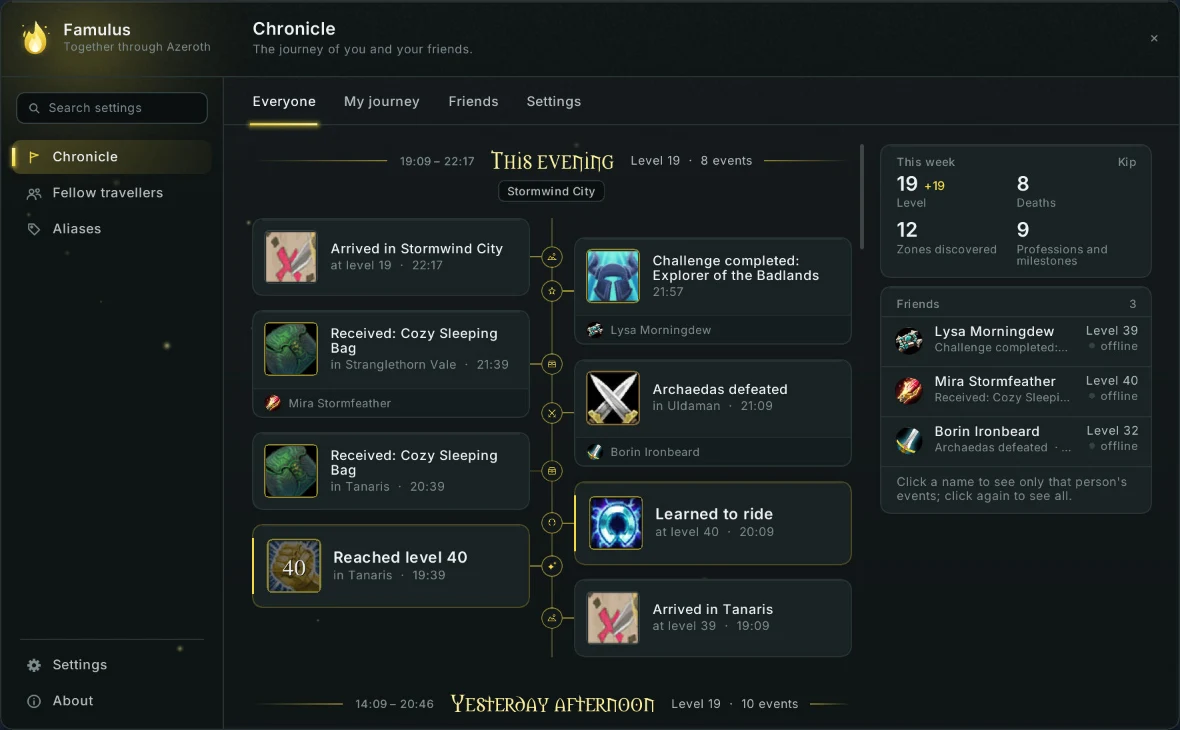
01Chronicle
Your journey, told like a picture book.
Level-ups, deaths, defeated bosses, new zones, professions and special finds: the chronicle records what you and your companions go through, one chapter per day.
Famulus talks to Famulus
Friends who use the addon share their milestones with you, wherever in the world they are. Only with people on your friends list or in your guild.
Offline, but not left out
If you were not online, a mutual companion passes on what you missed.
You decide what is written
Recording and sharing are off until you switch them on. Companions appear under the alias you gave them.
02Fellow travellers
Remember who was there.
Famulus remembers who you were in a group with: when and where you met, how often and how long you travelled together, and which bosses fell along the way. The others don't need Famulus for it.
Try it: a click on a tile or a name opens your story with that person.
A bond that grows
From Encounter to Inseparable: four tiers by the time you spent together. The ring around the crest shows how far it is to the next.
Your story, day by day
Every person has a book of your days together: where you were, for how long, which bosses fell and when you met.
It stays with you
Famulus only starts remembering once you switch it on, and sends none of it anywhere. Battlegrounds and arenas never count.
03Live feed
Be there when it happens.
When a companion defeats a boss or learns to ride, a card appears on your screen for a few seconds. Where it sits, how long it stays and which events it shows, your own too if you like, is up to you.
04Aliases
Call them by the names you know.
Behind every character name is someone you call something else. Give players an alias and Famulus shows it in chat and in tooltips. Only you see it; whispers, invites and links still reach the character.
Names
New alias
Your aliases
Aliases in chat
Shows the alias instead of the character name in front of chat messages. Whispers and invites still go to the character.
Alias in the tooltip
Adds a line with the alias to the tooltip of a player.
Alias in the context menu
Right-clicking a player or Battle.net friend offers to set, change or remove their alias.
Try it: give Yorick Talwind an alias, change one, or switch the display under Settings in the sidebar.
One alias for the whole account
Enter a friend's BattleTag and the alias covers all of their characters. Famulus remembers each one they come online with.
A right-click is enough
“Set alias” is in the context menu of players and Battle.net friends. No list to open, no name to type.
Nothing gets overwritten
The alias only changes what you read. Links keep the real name, and Blizzard's interface stays untouched.
05Installation
Ready in a minute.
- 1
Copy the folder
Put the folder
FamulusintoWorld of Warcraft/_forever_/Interface/AddOns/. - 2
Start the game
If it was already running, restart it so that it finds the new folder.
- 3
Open the window
/famopens Famulus. The flame at the minimap does the same.

Famulus is still being built.
Version 0.1.0 is an early state. The download follows with the first public release.